Ymmersive Foliage for Hytale
Improves tree leaves with more density and color variation, so distant forests stop looking flat and repetitive. Subtle and light on performance.
Download Ymmersive Foliage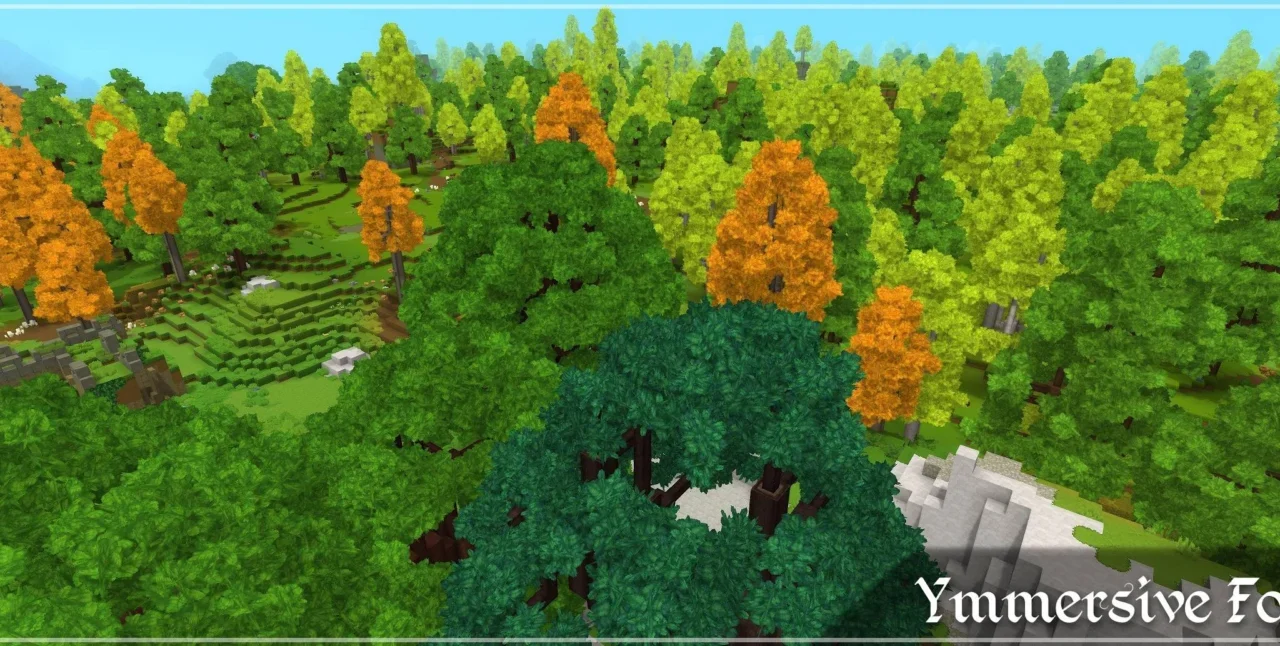
More screenshots on CurseForge ↗
What this mod does
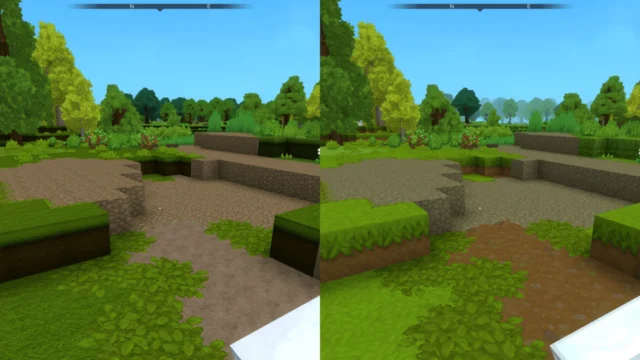
Hytale’s forests have a problem you mostly notice from a distance: the treetops repeat the same pattern and the whole thing looks flat. Ymmersive Foliage, by Conczin, reworks leaf foliage to give it more density and color variety. It has over 91,000 downloads on CurseForge, and its version 1.0.4, from September 9, 2026, is updated for Hytale 0.6.4.
What changes
- Denser leaves, with fuller canopies.
- More color variation between leaves, which breaks up the monotony of forests seen from afar.
- Fewer repeated patterns and more contrast and depth.
The author describes it as a subtle change that’s light on performance: it’s not a shader pack and it doesn’t change the lighting, only how leaves look. In the gallery you can compare a screenshot of the base game with one using the mod.
Who it’s for
For anyone who wants the world to look a bit more alive without changing Hytale’s style or losing frames. It goes well with other visual mods and with the same author’s building mods, Ymmersive Masonry and Ymmersive Carpentry. It doesn’t need other mods.
For now it only affects leaves; the author plans to extend it to bushes, grass and other types of vegetation.
Checked on October 20, 2026: the author hasn’t yet released a file on CurseForge tagged for Hytale 0.7 (Update 7). We’ll check again and update this page as soon as it’s out.
User rating
Highlights and things to keep in mind
- Forests with more depth and less repetition
- Subtle change that respects Hytale's style
- Lightweight with no dependencies
- For now it only affects tree leaves
- The effect is more noticeable at a distance than up close
Requirements
- Hytale (Early Access) on PC, version 0.6
- No other mods needed
How to install it
- Open the Ymmersive Foliage page on CurseForge and click Install to install it with the CurseForge app, or download the file ymmersive-foliage-1.0.4.jar (version for 0.6) from the Files tab.
- If you download it manually, copy the file as is, without unzipping it, into the mods folder: on Windows %APPDATA%\Hytale\UserData\Mods.
- Open Hytale, right-click the world where you want to use it, tick Ymmersive Foliage in the mod list and save the world settings.
- On a dedicated server, place the file in the server's mods folder and restart it.
- Load into the world and head to a forest: the change is most noticeable when looking at trees at mid and long range.
Version history
-
1.0.49 Sep 2026Current
Updated to Hytale 0.6.4
-
1.0.330 May 2026
Updated to Hytale 0.5.3
-
1.0.218 Feb 2026
Updated to a new game version
Common problems
Does it hurt performance?
The author presents it as a lightweight change designed not to affect performance. If in doubt, compare your FPS in a forest with and without the mod.
Does it change grass or bushes?
Not yet. For now it only modifies tree leaves; the rest of the vegetation is in the author's plans.
Is it a shader?
No. It doesn't touch the lighting or the overall color of the image, only the leaf foliage.
More mods for Hytale
 Multiplayer