(AT) Chest Deco for Stardew Valley
An Alternative Textures pack with dozens of new looks for your chests, applied with the Paint Bucket from Robin. Version 1.4 from June 2026.
Download (AT) Chest Deco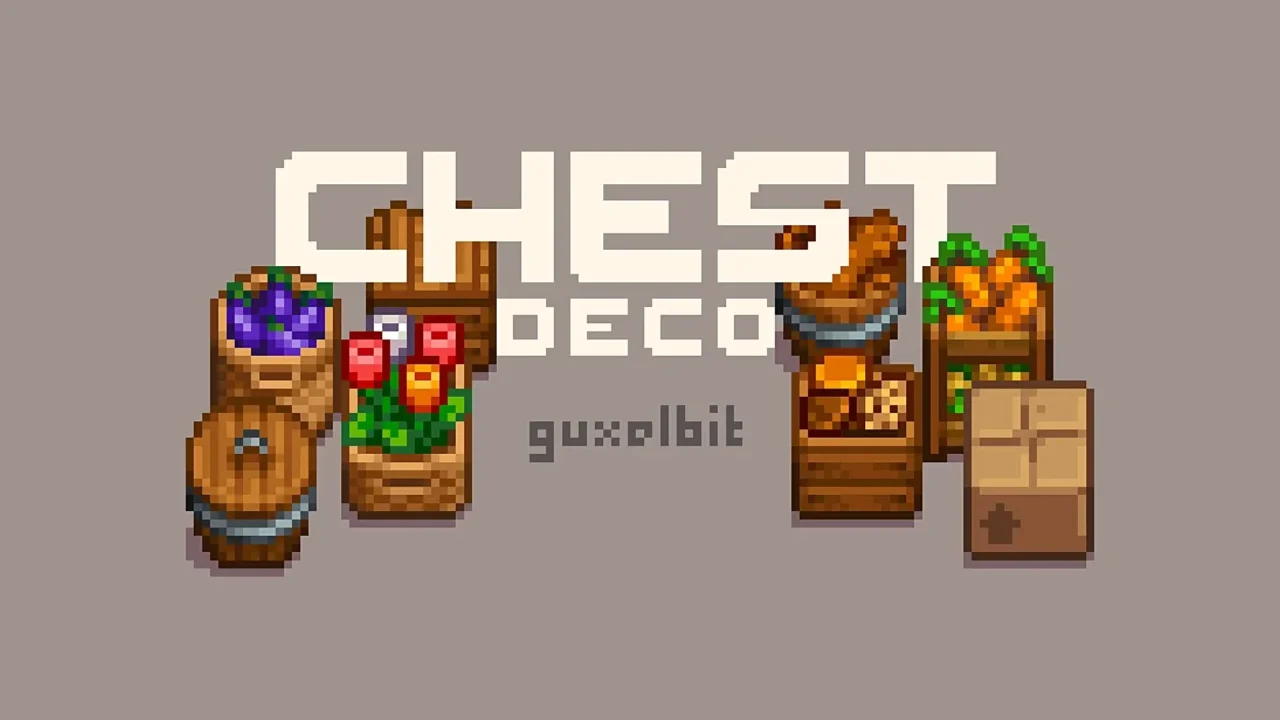
More screenshots on Nexus Mods ↗
What this mod does
(AT) Chest Deco, by guxelbit, starts from a simple idea: regular chests are a bit boring. It adds lots of new looks for them through Alternative Textures, without creating new items or changing how chests work.
How to use it
- Place a regular chest on your farm or in your house.
- Buy the Paint Bucket that Alternative Textures adds to Robin’s shop.
- Use the bucket on the chest to see the available looks and pick one.
Versions and compatibility
It needs SMAPI and Alternative Textures. The 1.4 main file (June 22, 2026, 240 KB) is the current version, and there’s an optional file with the old 1.2 textures that can be used alongside the new one if you prefer those designs. The author asks you to delete the previous version before updating and recommends backing up your saves.
Since it’s an Alternative Textures pack, it doesn’t change the look of every chest at once: you choose chest by chest, which helps you organize your storage by color or theme. It’s handy alongside storage mods like Chests Anywhere or Convenient Inventory. The mod’s page doesn’t mention multiplayer or translations, and it has no text to translate.
User rating
Highlights and things to keep in mind
- Lots of looks for your chests
- You choose chest by chest
- Updated in June 2026
- Keeps the old textures available
- Requires Alternative Textures
- You have to delete the previous version when updating
- Very brief description on Nexus
Requirements
- Stardew Valley 1.6.x (PC)
- SMAPI 4.x
- Alternative Textures
How to install it
- First install SMAPI and Alternative Textures (see their mod pages) and launch the game once with SMAPI to check that everything loads.
- Open the (AT) Chest Deco page on Nexus Mods, go to the Files tab and click Manual download on the main file (Chest Deco 1.4). You need a free Nexus account to download.
- Back up your saves and, if you had an older version, delete its folder.
- Unzip the .zip outside the game folder and move the resulting folder into the Mods folder inside the game folder.
- Launch the game with SMAPI, buy the Paint Bucket at Robin's shop and use it on a chest to choose its look.
Version history
-
1.422 Jun 2026Current
Current version
-
1.217 Oct 2024
Old textures, available as an optional file
-
1.313 Oct 2024
Previous version
Common problems
Does it change every chest at once?
No. With the Paint Bucket you choose each chest's look separately.
Can I keep using the old designs?
Yes, the optional Chest Deco 1.2 (old textures) file can be used alongside the new one.
Where's the Paint Bucket?
Alternative Textures adds it to Robin's shop.
More mods for Stardew Valley
 ✓ Stardew Valley 1.6
  ✓ Stardew Valley 1.6
  ✓ Stardew Valley 1.6
  ✓ Stardew Valley 1.6Multiplayer
  ✓ Stardew Valley 1.6
  ✓ Stardew Valley 1.6