Remote Fridge Storage for Stardew Valley
Mark chests as a pantry and your kitchen will use their ingredients when cooking, without moving them to the fridge. Version 1.10.2 from March 2026.
Download Remote Fridge Storage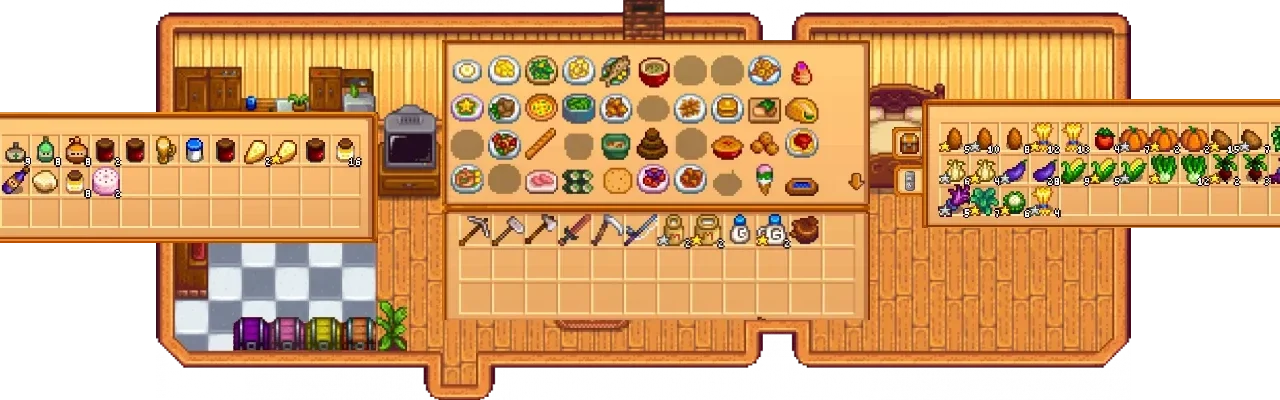
More screenshots on Nexus Mods ↗
What this mod does
Remote Fridge Storage, created by EternalSoap, solves a very common organization problem: the fridge in your house fills up and ingredients end up scattered across several chests. With this mod you can mark chests as ingredient storage, and the kitchen will use them as if they were in the fridge.
How it works
- Open a chest and click the fridge icon to mark or unmark it.
- When you cook, recipes pull ingredients from every marked chest.
- You can move the icon by dragging it with the right mouse button.
Compatibility
It only requires SMAPI. Version 1.10.2 (March 14, 2026, 23 KB) adds compatibility with The Love of Cooking; 1.10.1 was the 1.6 update. The page confirms that it works alongside Chests Anywhere and, partially, with Better Crafting if you turn off its cooking features. It warns that it may clash with other mods that change cooking or chests.
It works in multiplayer, but marks made by farmhands aren’t synced or saved. SMAPI’s compatibility list says that on Android it loads but doesn’t work.
User rating
Highlights and things to keep in mind
- Ends the full-fridge problem
- Compatible with The Love of Cooking and Chests Anywhere
- Updated in 2026
- Very easy to use
- Doesn't work on Android
- In multiplayer, farmhands' marks aren't saved
- May clash with other cooking or chest mods
Requirements
- Stardew Valley 1.6.x (PC)
- SMAPI 4.x (the latest version)
How to install it
- Install SMAPI first (see its page) and launch the game once with it to make sure it works.
- Open the Remote Fridge Storage page on Nexus Mods, go to the Files tab and click Manual download on the main file (Remote Fridge Storage 1.10.2). You need a free Nexus account to download.
- Unzip the .zip outside the game folder and move the resulting folder into the Mods folder, inside the game folder.
- Launch the game with SMAPI, open an ingredient chest and click the fridge icon to mark it; then try cooking.
Version history
-
1.10.214 Mar 2026Current
Compatibility with The Love of Cooking
Common problems
Does it work for chests outside the house?
The page talks about marking chests as ingredient storage; the safest bet is to keep them in the house, next to the kitchen.
Does it work in multiplayer?
Yes, but what farmhands mark isn't synced or saved.
What about Android?
SMAPI's compatibility list says that on Android it loads but doesn't work.
More mods for Stardew Valley
 ✓ Stardew Valley 1.6Multiplayer
  ✓ Stardew Valley 1.6Multiplayer
  ✓ Stardew Valley 1.6Multiplayer
  ✓ Stardew Valley 1.6
  ✓ Stardew Valley 1.6
  ✓ Stardew Valley 1.6