Cold Rain (Darkcaptain) for ATS for American Truck Simulator
Colder, more realistic rain in ATS: icy drops on the windshield, splashes on wet asphalt, dynamic sounds and about 20 thunderclaps. Version 0.48 for 1.57–1.61.
Download Cold Rain (Darkcaptain) for ATS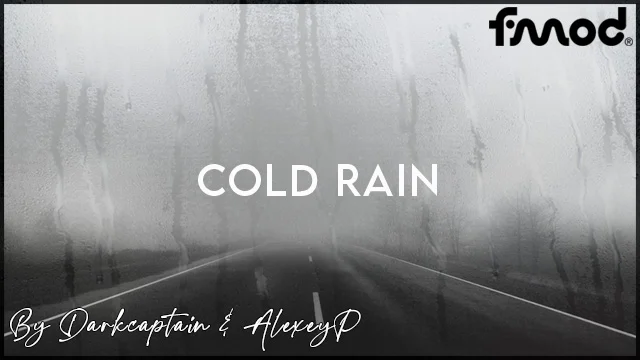
More screenshots on Steam Workshop ↗
What this mod does
Cold Rain is Darkcaptain‘s rain mod for American Truck Simulator, from the same author as Realistic Rain. It changes how rain looks and sounds, giving it a colder, almost icy feel.
What changes
- New raindrop textures on the windows and windshield, more drops inside the cab and better outdoor rain.
- Vision effects: blurry, icy or fogged up depending on how the drops fall.
- Wheel spray on wet asphalt, both on your truck and in traffic.
- Interior and exterior rain sounds that change with the intensity, and about 20 thunder variants with a 1 to 5 second delay.
It doesn’t change rain probability, fog, weather or the sky. There are optional add-ons with more drops on the windshield (Medium and High).
Compatibility and load order
Version 0.48 is compatible with ATS 1.57 to 1.61 according to the author (updated on September 3, 2026). It needs to go at the very top of the Mod Manager, above weather and graphics mods, maps and sound. It works with Sound Fixes Pack, ProMods and other maps, and as an optional mod in Convoy.
Known issues
Don’t use it together with Realistic Rain, since they change the same things. Grimes’ Autumn Seasons disables the thunder. The author recommends turning off cabin reverb in the audio settings.
Holyfix Check
Will it work with your mods?
Load your game.log.txt and check whether this mod is for your ATS version, whether you're missing a mod or DLC it needs and where to place it.
It's in Documents › American Truck Simulator › game.log.txt. It's read in your browser: the file is never uploaded.
Something else failing? Holyfix for ATS checks all your mods at once.
User rating
Our rating
0.0 / 5- Drops and spray with a cold, realistic look
- Rain sounds that change with the intensity and about 20 thunder variants
- Compatible with Sound Fixes Pack, ProMods and modded maps
- Incompatible with Realistic Rain
- Must go at the very top of the load order
- Grimes' Autumn Seasons disables the thunder
- The author recommends turning off cabin reverb
Requirements
- American Truck Simulator 1.57 to 1.61
- Steam account
- No DLC or other mods required
How to install it
- Open the "Cold Rain v0.48" page on Steam Workshop and click "Subscribe".
- If you want more drops on the windshield, also subscribe to one of the Medium or High add-ons.
- Launch American Truck Simulator and wait for Steam to download the mod.
- In the Mod Manager, enable Cold Rain and move it to the very top, above weather, graphics, maps and sound.
- Disable Realistic Rain if you had it.
- In Options › Audio, turn off cabin reverb, as the author recommends.
Version history
-
0.483 Sep 2026Current
Latest update (the changelog has 28 entries)
-
16 Apr 2021
Released on Steam Workshop
Common problems
Can I use it with Realistic Rain?
No. Both change the same parts of the game: use only one.
Does it change how often it rains?
No. It doesn't touch rain probability, fog, weather or the sky.
Does it work in Convoy?
The author marks it as compatible as an optional mod in Convoy.
I can't hear any thunder
Grimes' Autumn Seasons disables it, according to the author.
More mods for ATS
 ✓ ATS 1.61Multiplayer
  ✓ ATS 1.61
  ✓ ATS 1.61
  ✓ ATS 1.61
  ✓ ATS 1.61Multiplayer