Auto Sort – Organizer chest for Hytale
Organizer chest that sends each item you dump into it to nearby chests already holding it, and supplies furnaces and tanneries. Version 1.3.3 for Hytale 0.6.
Download Auto Sort – Organizer chest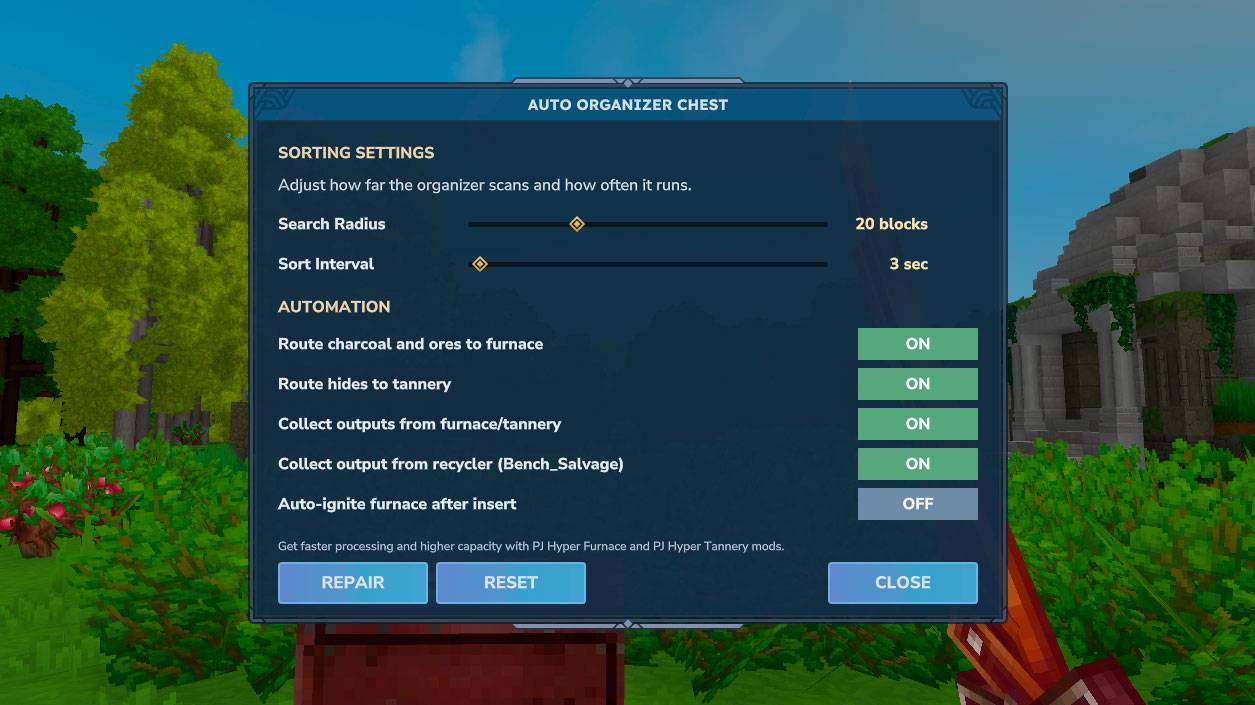
More screenshots on CurseForge ↗
What this mod does
Auto Sort – Organizer chest, by PedriJoe, adds the Hyper Organizer Chest: a chest you dump your inventory into, and it sends each item to the nearby chests that already contain that same item type.
How it works
- It checks its contents every 3 seconds and looks for chests within a 20-block radius.
- It only moves an item to a chest that already has it, so you decide the layout: some stone in one chest, wood in another, and it does the rest.
- It remembers where the organizer chests are even if you restart the server.
- It takes fuel and materials to nearby furnaces and tanneries and collects what they and the salvagers produce.
Getting started
Get the chest (ID OrganizerChest), place it next to your storage, put a bit of each material in the surrounding chests and dump your inventory into the organizer.
Requirements and version
It needs PJ CoreLib, the shared library for the PJ mods. Version 1.3.3 (September 30, 2026) improves the interface and is for Hytale 0.6. Another option for sorting your storage is Automatic Storage.
This page has been checked with Hytale 0.6 (Update 6). With Update 7 (0.7), released on October 12, 2026, the author has already published a compatible file: version 1.3.4 (October 12, 2026).
User rating
Highlights and things to keep in mind
- Sorts your storage without going chest by chest
- Also supplies furnaces and tanneries
- Updated frequently
- Needs PJ CoreLib
- The page doesn't explain the chest's recipe or its options
- Update 7 (0.7) already has a compatible file from the author (October 12, 2026)
Requirements
- Hytale (Early Access) on PC or server, version 0.7 (file PJ-HyperOrganizerChest-1.3.4.jar)
- PJ CoreLib (required), in its 0.7 version
- Regular chests near the organizer, within 20 blocks
How to install it
- Open the Auto Sort - Organizer chest page on CurseForge and click Install to add it with the CurseForge app (install PJ CoreLib too), or download PJ-HyperOrganizerChest-1.3.4.jar from the Files tab.
- If you download it manually, also grab PJ CoreLib and copy both files as is, without unzipping them, into the mods folder: on Windows, %APPDATA%\Hytale\UserData\Mods.
- Open Hytale, right-click the world, check the mod and PJ CoreLib in the mod list and save the world settings.
- On a dedicated server, put both files in the server's mods folder and restart it.
- In game, place the Hyper Organizer Chest near your chests, put a sample of what you want stored in each chest and dump your inventory into the organizer.
Version history
-
1.3.412 Oct 2026Current
File for Hytale 0.7 (Update 7)
-
1.3.330 Sep 2026
Interface improvements
-
1.3.127 Aug 2026
First version tagged for Hytale 0.6
Common problems
Which chest does each item go to?
Only to nearby chests (20 blocks) that already contain that same item. If none has it, the item doesn't move.
Does it work with furnaces?
Yes: it takes fuel and materials to nearby furnaces and tanneries and collects their output and the salvagers' output.
Do I need other mods?
Yes, PJ CoreLib, the shared library for PedriJoe's mods.
More mods for Hytale
 Multiplayer
  Multiplayer
 Multiplayer
  Multiplayer
  Multiplayer