Ymmersive Masonry for Hytale
Adds hundreds of stone and dirt variants, with slabs and stairs, plus a Masonry Bench to carve them from regular blocks. Requires Resource Groups.
Download Ymmersive Masonry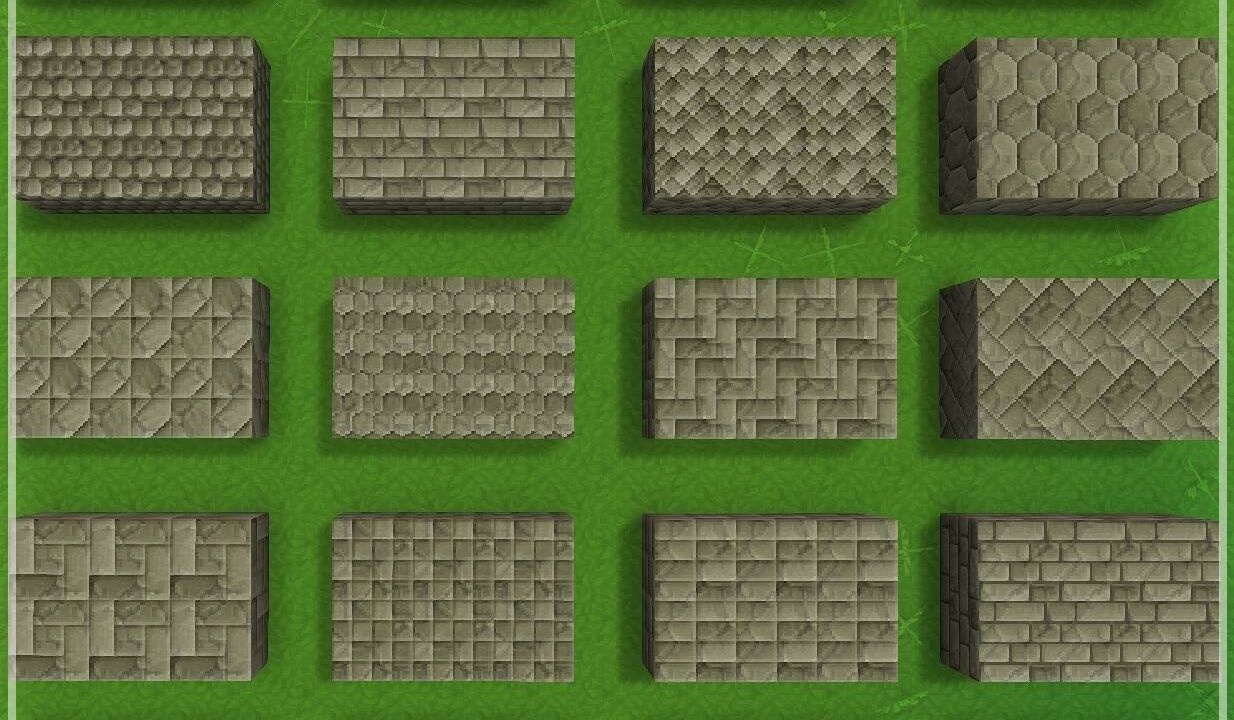
More screenshots on CurseForge ↗
What this mod does
Ymmersive Masonry is a mod made for builders. It adds hundreds of decorative stone and dirt variants, plus a Masonry Bench where you carve those variants from the game’s regular blocks.
What it adds
- Hundreds of stone and dirt finishes for walls, floors and details.
- Slab and stair versions for many of those materials.
- A Masonry Bench to turn base blocks into their variants.
Who it’s for
For players who build castles, walls, paths or stone houses and find the base game’s blocks lacking. It’s part of Conczin’s Ymmersive collection, alongside mods like Ymmersive Carpentry and Ymmersive Foliage.
Notes
It needs the Resource Groups mod, by the same author, installed and enabled. The author still plans to add custom icons and a dedicated interface for the bench. Version 1.1.4 is released for Hytale 0.6. Translations are managed collaboratively on Crowdin.
Checked on October 20, 2026: the author hasn’t yet released a file tagged for Hytale 0.7 (Update 7) on CurseForge. We’ll check again and update this page as soon as it’s out.
User rating
Highlights and things to keep in mind
- Hundreds of decorative variants for building
- Slabs and stairs in many materials
- Author with a consistent collection of building mods
- Requires Resource Groups
- According to the author, the bench icons and interface are still placeholders
Requirements
- Hytale (Early Access) on PC, version 0.6 for version 1.1.4 of the mod
- Resource Groups (required), also enabled in the world
- Enable the mod in the world settings or install it on the server
How to install it
- First install Resource Groups from its CurseForge page (or let the CurseForge app install it as a dependency).
- Open the Ymmersive Masonry page on CurseForge and click Install, or download the file from the Files tab.
- If you install it manually, copy both files into the mods folder: on Windows %APPDATA%\Hytale\UserData\Mods.
- Open Hytale, right-click the world, check Ymmersive Masonry and Resource Groups in the mod list and save the world settings.
- On a dedicated server, put both files in the server's mods folder and restart it.
- In game, craft the Masonry Bench and use it to carve the variants.
Common problems
The mod won't load or throws an error when joining
Make sure you have Resource Groups installed and enabled in the same world; it's a required dependency.
Where do I get the variants?
They're carved at the Masonry Bench from base stone and dirt blocks.
Is it translated into Spanish?
The page doesn't confirm it. Translations are done on Crowdin, so it depends on what the community has contributed.
More mods for Hytale
 Multiplayer
 Multiplayer