The Return Of Custom Backpack Framework for Stardew Valley
A framework that enables backpacks with extra rows and inventory scrolling. A 1.6 port of aedenthorn's mod; version 1.2.0 from July 2026.
Download The Return Of Custom Backpack Framework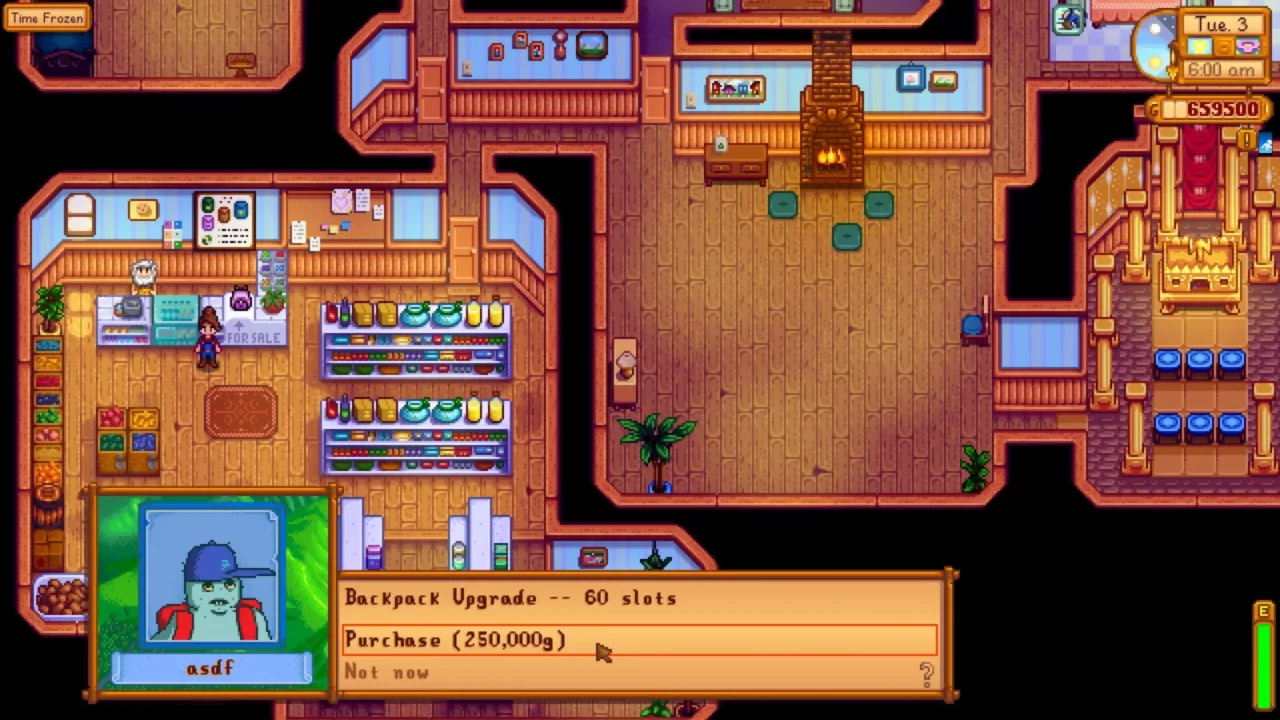
More screenshots on Nexus Mods ↗
What this mod does
The Return Of Custom Backpack Framework is platinummyr’s 1.6 port of aedenthorn’s original Custom Backpack Framework. It’s the technical foundation other mods use to give your farmer bigger backpacks than the game allows.
What it does
- Adds scrolling to the inventory grid with the mouse wheel, the arrow keys or a controller.
- Includes a «+» button to open an expanded inventory view.
- Lets you set the size with the console command
custombackpack 60(multiples of 12 are recommended). - Comes with a sample
content.jsonfor Content Patcher.
On its own it doesn’t change backpack upgrades: it needs a companion mod like The Return Of More Backpack Upgrades. If you just want a slightly bigger backpack, Bigger Backpack is a simpler alternative.
Requirements and compatibility
It requires SMAPI 4.0 or later and Generic Mod Config Menu. Version 1.2.0 (July 28, 2026, 34 KB) fixes toolbar scrolling and adds compatibility with Convenient Inventory. The author warns that it hasn’t been tested much and that new 1.6 content that loads the inventory may not work well. There are community translations into Portuguese and Chinese.
User rating
Highlights and things to keep in mind
- Enables much bigger backpacks
- Compatible with controllers and Convenient Inventory
- Updated in July 2026
- Doesn't expand the backpack on its own
- The author admits limited testing
- Possible issues with new 1.6 menus that use the inventory
Requirements
- Stardew Valley 1.6.x (PC)
- SMAPI 4.0 or later
- Generic Mod Config Menu
- A companion backpack upgrade mod
How to install it
- Install SMAPI first (see its page) and launch the game once with it to make sure it works.
- Also install Generic Mod Config Menu, which the page lists as a requirement.
- Open The Return Of Custom Backpack Framework page on Nexus Mods, go to the Files tab and click Manual download on the main file (Custom Backpack Framework 1.2.0). You need a free Nexus account to download.
- Unzip the .zip outside the game folder and move the resulting folder into the Mods folder, inside the game folder.
- Also install a mod that uses the framework, like The Return Of More Backpack Upgrades, or set the size with the custombackpack command in the SMAPI console.
- Launch the game with SMAPI, open your inventory and check that you can scroll through the new rows.
Version history
-
1.2.028 Jul 2026Current
Fixes toolbar scrolling; new GetShiftRows API method
-
1.0.02 Apr 2024
Initial port for 1.6 and SMAPI 4.0
Common problems
Do I get a bigger backpack as soon as I install it?
No. You need a companion mod or to set the size with the custombackpack command.
Is it a reupload?
It's a 1.6 port of aedenthorn's mod, who is listed as a co-author on the page.
Does it work with Convenient Inventory?
1.1.0 added compatibility with its scrolling.
More mods for Stardew Valley
 ✓ Stardew Valley 1.6Multiplayer
  ✓ Stardew Valley 1.6
  ✓ Stardew Valley 1.6
  ✓ Stardew Valley 1.6
  ✓ Stardew Valley 1.6
  ✓ Stardew Valley 1.6