Elle’s Dirt and Cliff Recolor for Stardew Valley
Turns the yellow dirt into a more natural brown, darkens the cliffs and adds seasonal tilled soil and easier-to-see fertilizers. Version 1.3.0 for 1.6.
Download Elle’s Dirt and Cliff Recolor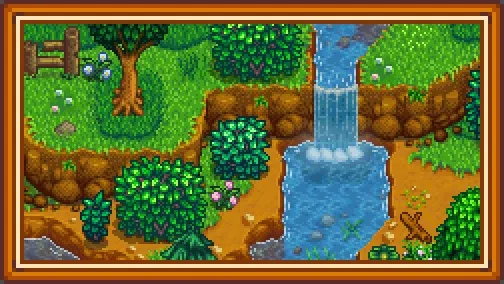
More screenshots on Nexus Mods ↗
What this mod does
Elle’s Dirt and Cliff Recolor fixes one of the most jarring details of the vanilla map: the yellow dirt. It turns it a more natural brown, darkens the brown dirt in the mountains and recolors the cliffs to match.
What’s included
- Tilled soil with seasonal colors and a recolor of the greenhouse soil.
- A seasonal minimap, which turns itself off if you have NPC Map Locations.
- Easier-to-see artifact spot worms and fertilizers, both optional.
- A recolor of Ginger Island and the Beach Farm.
Requirements and compatibility
It needs SMAPI and Content Patcher. Version 1.3.0 (April 5, 2026, 2.4 MB) fixes the greenhouse soil, the Meadowlands Farm recolors and a cliff that blocked the railroad tracks in spring; 1.2.8 had already adapted it to 1.6.
Every option is enabled by default and can be changed in config.json. It conflicts with map recolors that change the dirt and cliffs, such as Earthy Recolour, so it’s best to use only one. It pairs well with Elle’s Grass Replacement. The page doesn’t mention multiplayer or Android, and it has no text to translate.
User rating
Highlights and things to keep in mind
- Removes the vanilla game's yellow dirt
- Easier-to-see fertilizers and worms
- Updated in April 2026
- Options for the island, Beach Farm and minimap
- Conflicts with map recolors that change the dirt
- Configured by editing config.json
Requirements
- Stardew Valley 1.6.x (PC)
- SMAPI 4.x
- Content Patcher
How to install it
- First install SMAPI and Content Patcher (see their mod pages) and launch the game once with SMAPI to check that everything loads.
- Open the Elle's Dirt and Cliff Recolor page on Nexus Mods, go to the Files tab and click Manual download on the main file (Dirt and Cliff Recolor 1.3.0). You need a free Nexus account to download.
- Unzip the .zip outside the game folder and move the resulting folder into the Mods folder inside the game folder. If you had an older version, delete it first instead of overwriting it.
- Launch the game once with SMAPI so config.json is generated and turn off anything you don't want there: dirt and cliff recolor, island, Beach Farm, fertilizers, worms or minimap.
Version history
-
1.3.05 Apr 2026Current
Fixes the greenhouse soil, the Meadowlands Farm and a cliff on the railroad tracks
-
1.2.825 Mar 2024
Update for 1.6; fixes rice puddles and Abigail's 14-heart event
Common problems
Does it change the cliffs too?
Yes, they're recolored to match the new dirt.
Does it conflict with NPC Map Locations?
No: the minimap recolor turns itself off if it detects it.
Can I use it with a full map recolor?
It's not recommended if that recolor also changes the dirt and cliffs.
More mods for Stardew Valley
 ✓ Stardew Valley 1.6Multiplayer
  ✓ Stardew Valley 1.6Multiplayer
  ✓ Stardew Valley 1.6
  ✓ Stardew Valley 1.6Multiplayer
  ✓ Stardew Valley 1.6Multiplayer
  ✓ Stardew Valley 1.6Multiplayer