Lili’s Portraits – Match SDV 1.6 for Stardew Valley
Anime-style portraits for every villager, with Ginger Island and winter outfits, updated for 1.6. You install them by replacing .xnb files.
Download Lili’s Portraits – Match SDV 1.6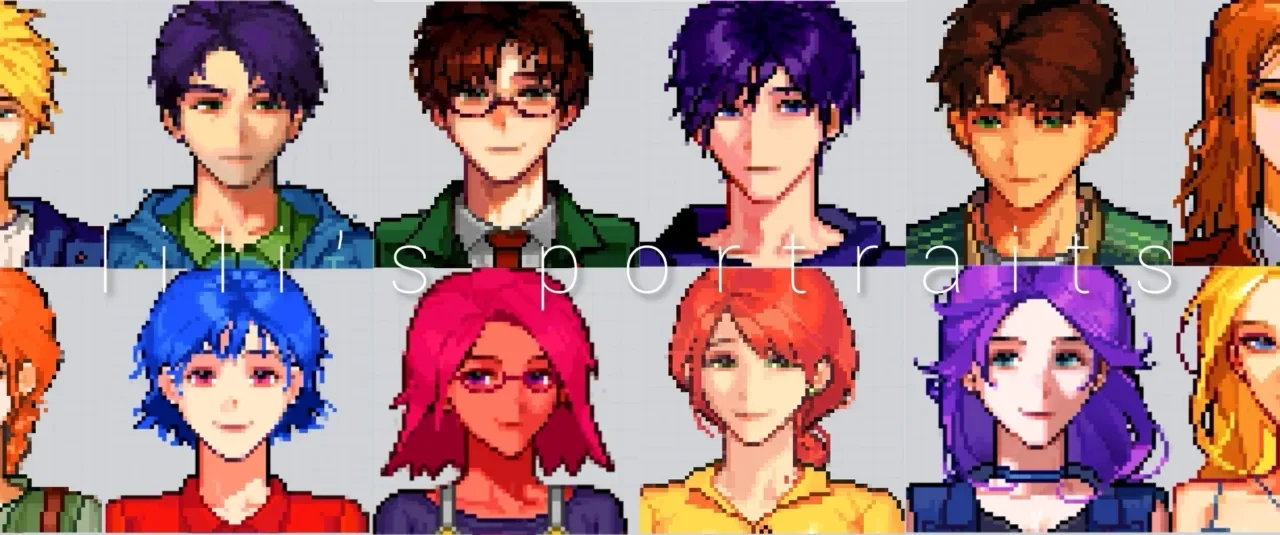
More screenshots on Nexus Mods ↗
What this mod does
Lili’s Portraits replaces the portraits of every villager in Stardew Valley with anime-style ones, more detailed and softer than the originals. It’s updated for 1.6.
What’s included
- Regular portraits for every villager.
- Dedicated portraits with the Ginger Island clothes and the winter outfits.
- Bearded and beardless variants for the Wizard and Harvey: by default the Wizard has a beard and Harvey doesn’t.
- Version 1.4.0 (December 14, 2025, 1.4 MB) refreshed Sam’s and Shane’s work portraits.
Installation and compatibility
It doesn’t use Content Patcher: these are .xnb files you copy into the Portraits folder, inside the game’s Content folder, replacing the originals. That’s why it doesn’t need SMAPI, but you should back up that folder first, and a game update or file verification on Steam can bring back the original portraits.
Because it replaces game files, it conflicts with any other mod that changes the same portraits, and the page says nothing about Stardew Valley Expanded or Android. The description is in Chinese. If you’d rather have a mod that doesn’t touch game files, mono’s Portraits works with Content Patcher.
User rating
Highlights and things to keep in mind
- Portraits for every villager, including island and winter ones
- Updated in December 2025
- Bearded and beardless variants for the Wizard and Harvey
- Replaces game files: you need to make a backup
- Conflicts with other portrait mods
- A game update can undo it
- Description in Chinese only; doesn't mention SVE or Android
Requirements
- Stardew Valley 1.6.x (PC)
- Doesn't need SMAPI or Content Patcher (replaces .xnb files)
How to install it
- Open the game folder, go into the Content folder and back up the Portraits folder.
- Open the Lili's Portraits page on Nexus Mods, go to the Files tab and click Manual download on the main file (lili'portraits 1.4.0). You need a free Nexus account to download.
- Unzip the .zip outside the game folder.
- Copy the .xnb files into the Portraits folder inside the game's Content folder and agree to replace the originals. Don't put them in the Mods folder.
- If you prefer a beardless Wizard or a bearded Harvey, use the included alternate file and remove the suffix from its name.
- To uninstall it, restore your Portraits backup or verify the integrity of the game files on Steam.
Version history
-
1.4.014 Dec 2025Current
Refreshes Sam's and Shane's work portraits (update of December 15, 2025)
-
1.3.121 May 2024
Bearded and beardless variants for the Wizard and Harvey
-
1.2.129 Mar 2024
Update for 1.6
Common problems
Does it need SMAPI?
No. It directly replaces the game's .xnb files.
Does it work with SVE?
The page doesn't mention it. It only changes the portraits it replaces; new SVE characters would keep their own portraits.
How do I go back to the original portraits?
Restore the backup of the Portraits folder or verify the game files on Steam.
More mods for Stardew Valley
 ✓ Stardew Valley 1.6Multiplayer
  ✓ Stardew Valley 1.6Multiplayer
  ✓ Stardew Valley 1.6Multiplayer
  ✓ Stardew Valley 1.6Multiplayer
  ✓ Stardew Valley 1.6Multiplayer
  ✓ Stardew Valley 1.6Multiplayer