Medieval Buildings for Stardew Valley
Redraws every farm building with a medieval look and seasonal changes: houses, barns, coops, sheds and the greenhouse. Version 2.2 for Stardew Valley 1.6.
Download Medieval Buildings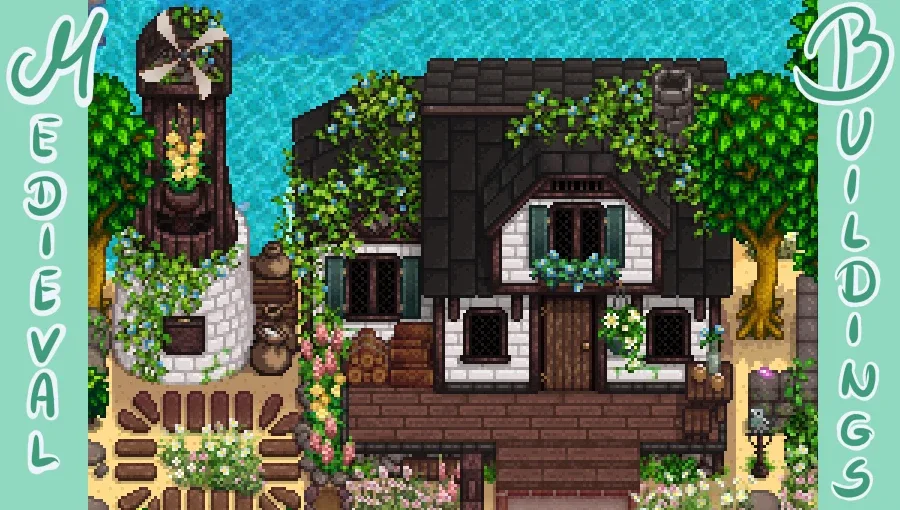
More screenshots on Nexus Mods ↗
What this mod does
Medieval Buildings, by Gweniaczek, is one of the most downloaded farm building retextures. It started as a small touch-up and ended up redrawing the whole set with a medieval feel of stone, wood and flowers, with variants for each season.
What it changes
- The farmhouse, a remade greenhouse, barns, coops, sheds, silos, mill, well, Junimo Huts, obelisks, fish ponds and mailbox.
- Several options in
config.json: four houses, two sheds, two cabins and unique designs for each barn, coop and shed upgrade. - More or less greenery on the buildings and optional petals on windy spring days.
- Colors adjusted for several recolors, including DaisyNiko’s Earthy Recolour and Vibrant Pastoral.
Requirements and compatibility
It needs SMAPI and Content Patcher. File 2.2 (March 20, 2024, 84.8 MB) is updated for 1.6 and the page marks it as Android compatible. The author asks you to delete the previous version instead of overwriting it and to check that the new buildings are enabled in the BuildingsReplaced list.
To make the town match, the author herself publishes Way Back Pelican Town, and her medieval craftables complete the style.
User rating
Highlights and things to keep in mind
- A very complete and consistent set of farm buildings
- Seasonal changes and lots of variants per building
- Palettes matching the most popular recolors
- Only needs Content Patcher
- Large file (84.8 MB)
- Configured by editing config.json
- You have to delete the previous version when updating
- The compatibility pack (East Scarp, Tractor Mod…) is from 2022
Requirements
- Stardew Valley 1.6.x (PC; the page also marks it as Android compatible)
- SMAPI 4.x
- Content Patcher
How to install it
- First install SMAPI and Content Patcher (see their mod pages) and launch the game once with SMAPI to check that everything loads.
- Open the Medieval Buildings page on Nexus Mods, go to the Files tab and click Manual download on the main file (Medieval Buildings 2.2). You need a free Nexus account to download.
- Unzip the .zip outside the game folder and move the resulting folder into the Mods folder inside the game folder. If you had an older version, delete it first instead of overwriting it.
- Launch the game with SMAPI so config.json is generated, close it and choose the model for each building in that file. Check that the buildings you want to change appear in BuildingsReplaced.
Version history
-
2.220 Mar 2024Current
Update for 1.6: fixes the Slime Hutch and the mailbox and recolors the pet bowl
-
2.110 Jan 2022
Farmhouse floor option and a fix for the farmhouse entrance on Android
-
2.09 Nov 2021
Complete restructuring and per-building upgrade options
Common problems
Does it change the town buildings?
No, only the farm buildings. For the town, the same author has Way Back Pelican Town.
Can I keep some original buildings?
Yes. Just remove them from the BuildingsReplaced list in config.json.
Is there a mobile version?
The page marks the mod as Android compatible and keeps a 2.1 version for 1.5.6 and Android under Optional files.
More mods for Stardew Valley
 ✓ Stardew Valley 1.6Multiplayer
  ✓ Stardew Valley 1.6Multiplayer
  ✓ Stardew Valley 1.6Multiplayer
  ✓ Stardew Valley 1.6Multiplayer
  ✓ Stardew Valley 1.6Multiplayer
  ✓ Stardew Valley 1.6Multiplayer