AC Head Physics for Assetto Corsa
Simulates driver head inertia with a physics-based six-degree-of-freedom "neck", plus stabilization, horizon lock and apex look-ahead. Free; needs CSP 0.2.0.
Download AC Head Physics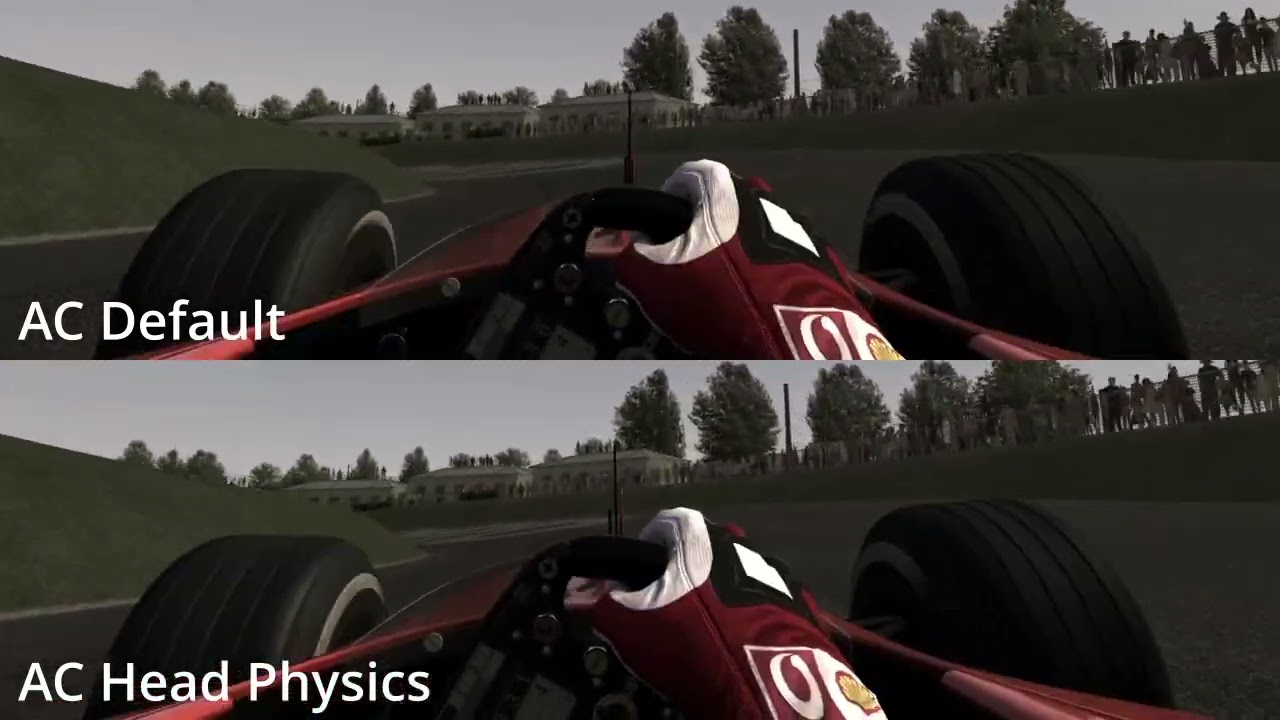
More screenshots on OverTake.gg (formerly RaceDepartment) ↗
What this mod does
AC Head Physics is a script for Assetto Corsa that simulates how the driver’s head moves under the car’s acceleration forces. gurkesaft built it from a VR stabilization script by Jordash, and it works the same in VR and on a flat screen.
How it works
- The head is attached to a «neck» that acts like a spring with six degrees of freedom: three for translation and three for rotation.
- Each axis has adjustable stiffness and damping and can be turned on or off.
- Optional stabilization mimics your eyes and partly makes up for the missing inner ear.
- Full or partial horizon lock for pitch and roll.
- Look-ahead toward the slip angle, the corner apex or the steering direction.
- Optional head-jolt effect on gear shifts.
Performance and settings
The author reports about 35 microseconds of CPU time per frame on a 12th-gen Intel i5. The defaults are tuned for a GT3; if you want more movement, raise the stiffness. Every setting shows an explanation when you hover over it in Content Manager.
Version
Version 2.2.3 (October 2024) added a smoothing filter for look-ahead, speed thresholds for the effects and an optional frequency limit for vibrations. Version 2.1.8 lets you disable look-ahead when switching to VR.
User rating
Mod video
Highlights and things to keep in mind
- Physics-based, highly configurable head movement
- Works in VR and on screen
- Barely uses any CPU
- Needs CSP 0.2.0 or later with NeckFX
- Some settings require the Content Manager preview build
- Lots of parameters: takes some experimenting
Requirements
- Assetto Corsa for PC
- Custom Shaders Patch 0.2.0 or later with NeckFX enabled
- Content Manager (the mod page recommends its preview build to see every setting)
- Free OverTake.gg account to download
How to install it
- Update Custom Shaders Patch to 0.2.0 or later and enable NeckFX.
- Go to the AC Head Physics page on OverTake.gg, log in and download the file (about 62 KB).
- Drag it into the Content Manager window and confirm the installation.
- Find the script's settings in Content Manager; hover over each option to see its explanation.
- Start with the defaults (tuned for a GT3) and adjust the stiffness to your liking.
- In VR, enable the option to disable look-ahead if you want.
Version history
-
2.2.326 Oct 2024Current
Smoothing filter, better low-speed transition and fast-vibration pass-through
-
2.1.87 Jul 2024
Option to disable look-ahead in VR
-
2.1.3b21 May 2024
Look-ahead, horizon lock and gear-shift jolt
Common problems
I can't see all the options
The mod page says you need the latest preview build of Content Manager.
Does it work in VR?
Yes, it works the same in VR and on a flat screen.
The movement is too subtle
Raise the axis stiffness; the defaults are tuned for a GT3.
More mods for Assetto Corsa

 Multiplayer