Yer’s Labels for Hytale
Over 80 labels you place on chests to see what's inside without opening them; switch designs with the builder's hammer. Version 1.2.4 for Hytale 0.7.
Download Yer’s Labels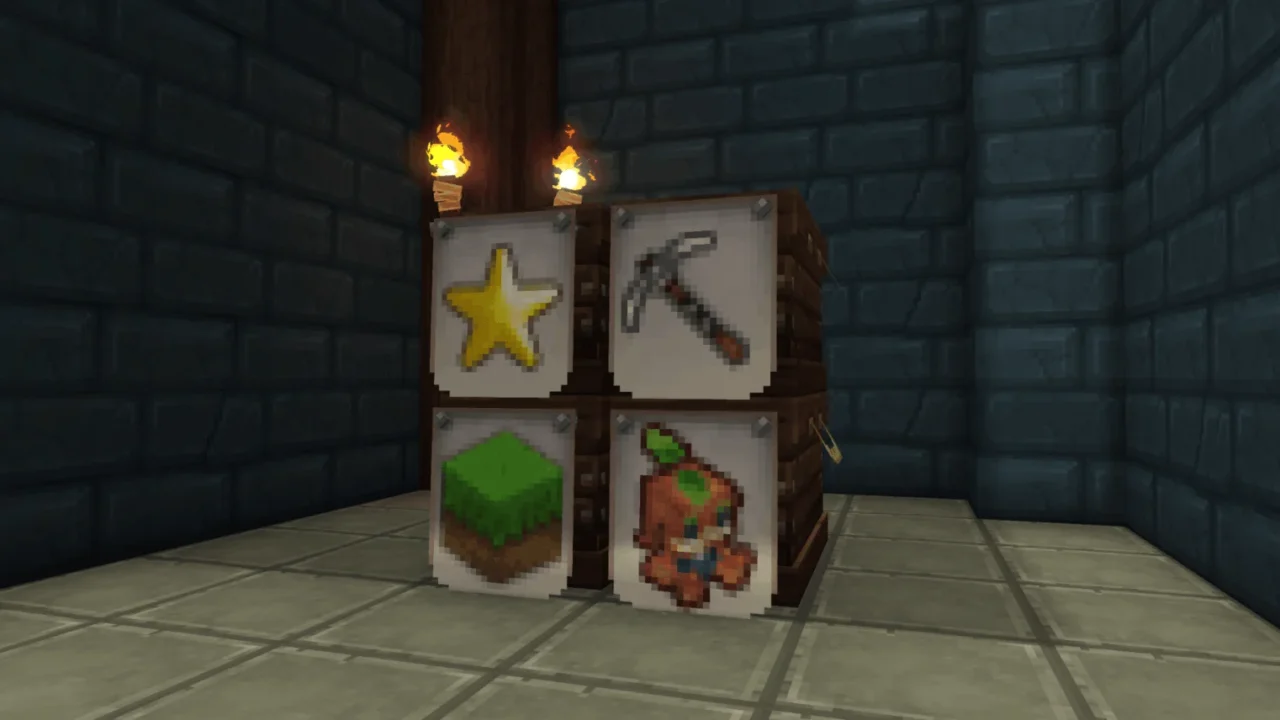
More screenshots on CurseForge ↗
What this mod does
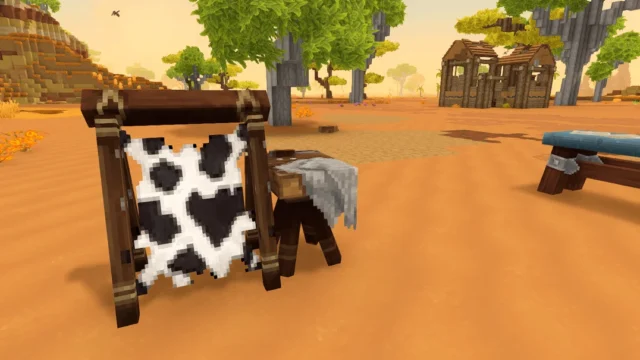
Yer’s Labels adds labels for chests and storage. You place them on the chest like a sign or a frame and, since their hitbox is small, the chest still opens without any trouble. That way you know what’s inside without having to open it.
How to use them
- They’re crafted at the Furniture Workbench, misc tab, with plant fiber and rubble.
- Once placed, hit the top with the builder’s hammer to cycle through the symbols in its category.
- You can also switch them at the Builder’s Workbench, grouped into icon and text sets; the author warns that some variants may be missing there due to crafting system limitations.
- There are over 80 designs: text, items, blocks and symbols.
It doesn’t add its own benches: it uses the base game’s and has no commands or settings.
Update 7
Version 1.2.4, from October 12, 2026, is the file for 0.7 (changelog: «Bumped game version»). It’s the first update since 1.2.3 in March, which was only tagged as Early Access, and it weighs 809.8 KB. It has no dependencies. It pairs well with Wan’s Storage Drawers or ModernStorage if you’re organizing your storage room. If this is your first mod, see how to install mods in Hytale.
User rating
Highlights and things to keep in mind
- Over 80 designs
- No new benches or dependencies
- Doesn't get in the way when opening chests
- Some variants may be missing at the Builder's Workbench
- 1.2.4 only bumps the game version: no new features
- All Rights Reserved license
Requirements
- Hytale (Early Access) on PC or server, version 0.7 (file Yernemm.Labels-1.2.4.zip)
- No dependencies
- A builder's hammer to change the symbol
How to install it
- Open the Yer's Labels page on CurseForge and click Install to set it up with the CurseForge app, or download Yernemm.Labels-1.2.4.zip from the Files tab (the file marked 0.7).
- If you download it manually, copy the file as is, without unzipping it, into the mods folder: on Windows, %APPDATA%\Hytale\UserData\Mods.
- Open Hytale, right-click the world, check Yer's Labels in the mod list and save the world settings.
- On a dedicated server, put the file in the server's mods folder and restart it.
- Craft the labels at the Furniture Workbench (misc tab), place them on your chests and hit their top with the builder's hammer until you get the symbol you want.
Version history
-
1.2.412 Oct 2026Current
Bumped game version (file marked 0.7)
-
1.2.329 Mar 2026
Previous version, tagged only as Early Access
Common problems
Do they stop the chest from opening?
No. They have a small hitbox precisely so the chest can still be opened.
How do I change the design?
Hit the top of the label with the builder's hammer, or switch it at the Builder's Workbench.
Does it need a new bench?
No. It's crafted at the base game's Furniture Workbench.
More mods for Hytale
 Multiplayer
  Multiplayer
  Multiplayer
  Multiplayer
  Multiplayer
  Multiplayer