Babies Take After Spouse Plus New Toddler Hair and Clothes for Stardew Valley
Your kids inherit your spouse's look, with new hairstyles and clothes for toddlers. Two versions: based on your spouse or fully up to you.
Download Babies Take After Spouse Plus New Toddler Hair and Clothes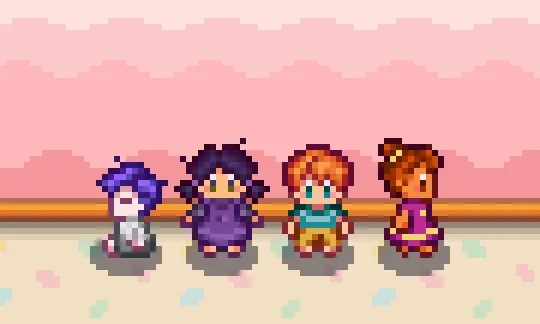
More screenshots on Nexus Mods ↗
What this mod does
Babies Take After Spouse, by lakoria, is one of the game’s longest-running and most downloaded mods (it was released in 2016). It replaces the children’s sprites so they look like your partner and adds new hairstyles and clothes for toddlers.
Two versions (pick one)
- v1: your kids are based on your base-game spouse. Hairstyle and skin tone are adjusted with Generic Mod Config Menu or in the config file. It doesn’t include spouses from other mods.
- v2: you choose the skin tone, hairstyle and the character they’re based on, for both boy and girl. It includes all the recolors, including those based on Sophia and Victor from Stardew Valley Expanded and on Diverse Stardew Valley, and it’s the option for adopted children.
What else is included
Outfit changes in fall and winter, darker skin tones for several spouses and sprite sheets adapted for hats, although the author warns that some hats may still look odd.
Requirements and compatibility
It needs SMAPI, Content Patcher and Generic Mod Config Menu. The 1.6 version was released on April 14, 2024. It only changes sprites: it’s for single player and doesn’t work well in multiplayer. For a more complete system, check out Unique Children.
User rating
Highlights and things to keep in mind
- Kids who look like your partner
- New hairstyles and clothes for toddlers
- Configurable with Generic Mod Config Menu
- Lightweight and very popular
- Doesn't work well in multiplayer
- Some hats look odd
- The author doesn't plan to expand it
- No Spanish translation (it has hardly any text)
Requirements
- Stardew Valley 1.6.x (PC; the page also marks it as Android compatible)
- SMAPI 4.x
- Content Patcher and Generic Mod Config Menu
- Single player only
How to install it
- First install SMAPI and Content Patcher (see their mod pages) and launch the game once with SMAPI to check that everything loads.
- Install Generic Mod Config Menu (see its mod page).
- Open the Babies Take After Spouse page on Nexus Mods, go to the Files tab and click Manual download on the main file (pick only one: Babies Take After Spouse v1 or v2, version 1.6). You need a free Nexus account to download.
- Unzip the .zip outside the game folder and move the resulting folder into the Mods folder inside the game folder.
- In-game, open Generic Mod Config Menu and choose the hairstyle, skin tone and, in v2, the character your kids are based on.
Version history
-
1.614 Apr 2024Current
Version for Stardew Valley 1.6 (v1 and v2)
-
1.4.126 Sep 2020
Fixes Abigail's children in fall and winter and adds a skin tone for Maru
Common problems
Which version should I choose?
v1 if you want them to look like your base-game spouse; v2 if you want to choose everything yourself or have adopted children.
Does it work in multiplayer?
No. The author made it for single player and warns that it doesn't work well in multiplayer.
Does it work with spouses from other mods?
v1 doesn't; v2 includes recolors based on Sophia and Victor from SVE.
More mods for Stardew Valley
 ✓ Stardew Valley 1.6
  ✓ Stardew Valley 1.6
  ✓ Stardew Valley 1.6
  ✓ Stardew Valley 1.6
  ✓ Stardew Valley 1.6
  ✓ Stardew Valley 1.6