
Hytale mods
Hytale mods checked for Update 7 (0.7): gameplay, maps, skins, shaders and tools, with each one's compatibility and a link to the official download.
 Multiplayer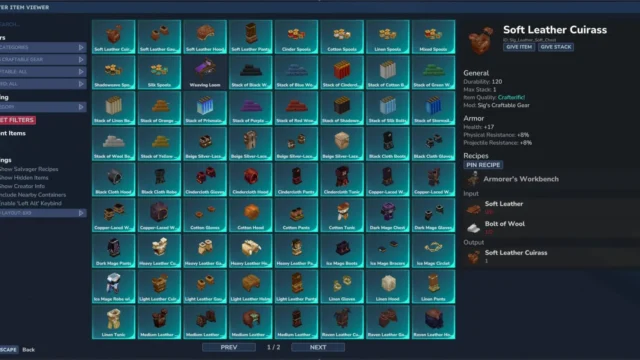
 Multiplayer
 Multiplayer
 Multiplayer
  Multiplayer
  Multiplayer
  Multiplayer
 Multiplayer
  Multiplayer
  Multiplayer
  Multiplayer
  Multiplayer
  Multiplayer
  Multiplayer
New in Hytale
Mods new on Holymod or updated by their authors in the last 14 days.
Multiplayer Multiplayer Multiplayer Here are 211 mods for Hytale, hand-picked one by one: weapons, dungeons, RPG progression, maps, inventory tools, skins and visual upgrades. Each page explains what the mod does and links only to its official download, usually CurseForge, the platform Hypixel Studios has partnered with for mods. All of these Hytale mods have been checked against the current early access build, Update 7 (versions 0.7.x): on each page we tell you whether the author has already released a file for 0.7, the mod's version and whether it needs libraries.
Types of Hytale mods
- Gameplay: new weapons, creatures, farming, seasons, skills and systems that change how you progress through Orbis.
- Tools: recipe viewers, improved maps, chest management, the Spanish translation and plugins for running servers.
- Skins: armor with a different look, cosmetics for your character and appearance variants for animals and wildlife.
- Maps: instanced dungeons, new structures that show up as you explore and prefabs to place in your world.
- Shaders: high-definition textures, denser foliage and a ReShade preset that improves lighting and color without losing the game's style.
Featured Hytale mods: where to start
If this is your first playthrough with Hytale mods, these are free and cover what the base game is most missing:
- Better Item Viewer (JEI): search for any item and see its recipe, what drops it and its hidden stats. Opens with Left Alt.
- BetterMap: the map remembers what you've already explored and adds a cave mode, waypoints with teleport and a shared server map.
- Vein Mining: mine an entire ore vein in one go by holding Left Alt, with configurable tunnel or cube patterns.
- RPG Leveling And Stats: levels, six classes and stat allocation, with monsters that get tougher depending on the zone.
- Endgame & QoL: content for when you've seen it all, with three multi-phase bosses, a new dimension and mounts. Comes with a Spanish translation.
- MAJOR DUNGEONS: multi-level dungeons with bosses, mimics and their own merchant, accessed through the Ancient Portal.
- Dynamic Seasons: spring, summer, fall and winter with their own weather and colors, and crops that yield more in their season.
- Spanish translation: an unofficial mod that translates item names and part of the text into Spanish, keeping the English name.
If you want more ideas sorted by use (map, combat, building, servers), check out our pick of the best Hytale mods.
How to install Hytale mods
- With the CurseForge app: choose Hytale, find the mod in the Discover or Browse tabs and click Install. The app puts it in the right folder.
- Manually: download the .zip or .jar file from the mod page and copy it to %APPDATA%HytaleUserDataMods on Windows. On Mac the folder is ~/Library/Application Support/Hytale/UserData/Mods and on Linux $XDG_DATA_HOME/Hytale/UserData/Mods.
- Enable it in the world: installing isn't enough. For a new world, go to Create World, click the settings gear and check the mods. For an existing one, right-click the world, select the mods and save the settings.
- Check the dependencies: several mods need libraries (for example, Wardrobe for the cosmetics packs or Resource Groups for Ymmersive Carpentry). We list them on each mod page.
You'll find the full process, with screenshots and common errors, in the guide how to install Hytale mods.
Hytale mods in single-player and on servers
Mods work differently in Hytale than in other games: according to Hypixel Studios, all modding depends on whoever hosts the game, and when you play solo you're actually joining a local server just for you. That's why mods are enabled per world rather than globally.
For Hytale server mods, the official server manual says you just need to drop the .zip or .jar files into the server's mods/ folder. Hypixel explains that you should be able to join a modded server without downloading anything separately. If you're going to set up your own, follow the guide to create a Hytale server and take a look at plugins like AdminUI, to manage players and backups from in-game windows, or Simple Claims, to protect land by chunks. If a modded server won't start or won't let you in, check the causes of the "failed to connect to server" error.
Hytale in Spanish
Since Update 7 (October 12, 2026), Spanish is one of Hytale's official languages. The community Spanish translation was the alternative until then, and some big mods like Endgame & QoL, MMO Skill Tree or Simple Enchantments include their own Spanish text. We explain how to change the language in Hytale in Spanish.
How we choose Hytale mods
We only add mods published by their author on their official page, and we check that they're up to date for the current version of the game. Since Hytale is in early access, every major update can break mods: before updating the game, check the version listed on each mod page.
Frequently asked questions about Hytale mods
Where do you download Hytale mods?
The official platform partnered with Hypixel Studios is CurseForge: you can install mods from its app or download the file and copy it manually. Every Holymod page links to the author's official download.
How do you add mods to Hytale?
Copy the .zip or .jar to %APPDATA%HytaleUserDataMods (or install it with CurseForge) and then enable it in the world settings: the gear when creating the world, or right-click an existing one.
I installed a mod and it doesn't show up in the game. Why?
In Hytale, mods are enabled per world. Open the world settings, check the mod and save. If it still doesn't work, make sure you have its dependencies and that it's compatible with your game version.
How do you install mods on a Hytale server?
According to the official manual, you copy the .zip or .jar files into the server's mods/ folder. Hypixel explains that players should be able to join a modded server without downloading the mods themselves.
Is Hytale available in Spanish?
Yes: since Update 7 (October 12, 2026), Spanish is an official language of the game. Before that there was an unofficial community translation, which is no longer needed.
Do Hytale mods work in Update 7?
It depends on the mod: many authors have already released a file for 0.7, and we note on each page whether one is available. Before updating an important world, check the version.
What are the best Hytale mods to start with?
Better Item Viewer for looking up recipes, BetterMap for the map, Vein Mining for mining and, if you want more content, Endgame & QoL or MAJOR DUNGEONS. All of them are free.
- Runestone Shards in Hytale: where to farm them fast→
- Hytale zones: biomes, the map of Orbis and portals→
- Hytale Goblin Lab: machines, workbench and backpack→
- Hytale failed to connect to server: causes and fixes→
- Hytale Voidheart: how to get it in 0.7 and its uses→
- Hytale goblin gadgets: Glider, Hookshot and Rocket Boots→
- How to make glass in Hytale (and windows)→
- Hytale Update 7 (Chapter I): everything new→